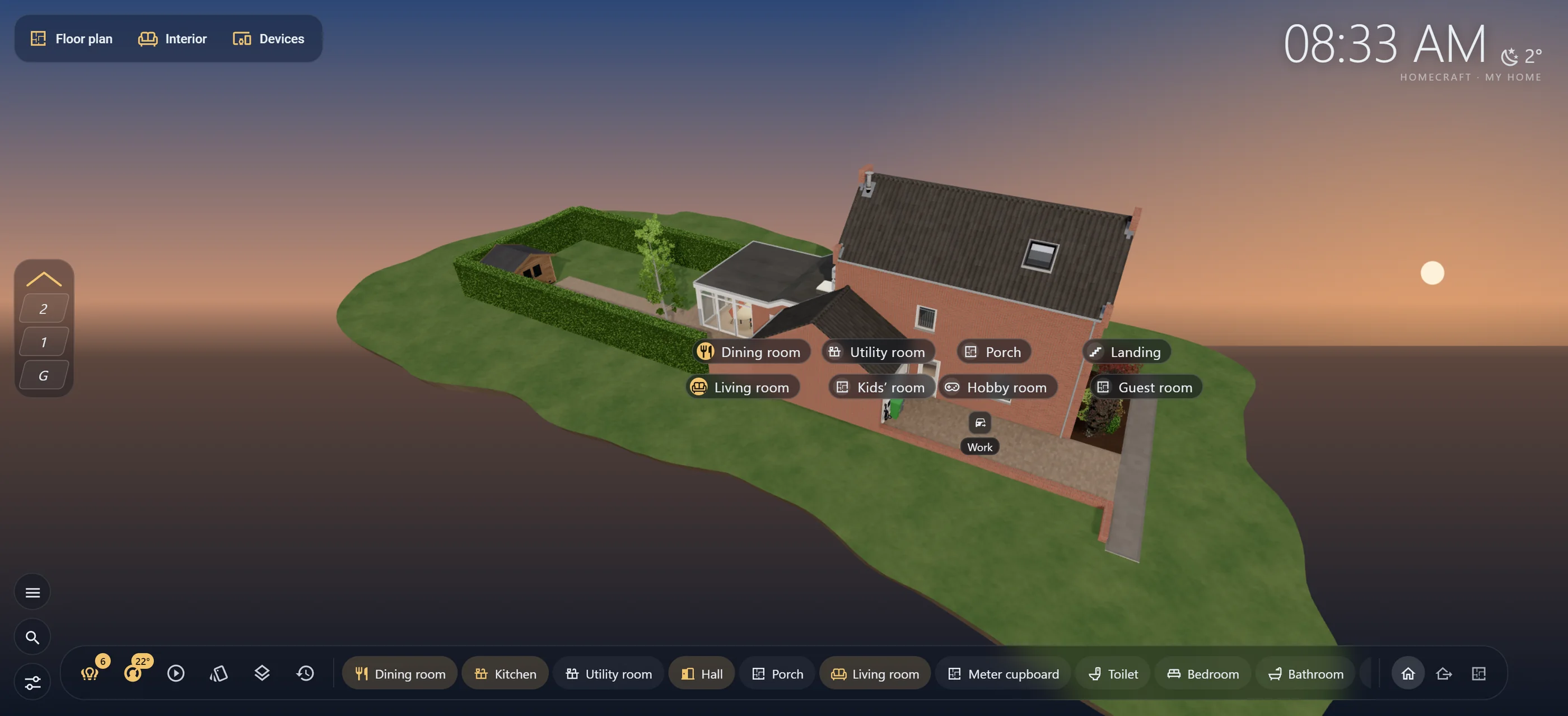
HomeCraft shows your home as a real 3D model in Home Assistant. Lamps glow the way they really shine, devices show their state, and you see at a glance what is happening at home.
Not lists of switches, but your own home: with the rooms you live in, the lamps that are on and the devices that are running.
3D from above, with live light
Your home as a real 3D model: facade, roof, floors and rooms. Daylight follows the sun and the weather; lamps are real light sources that dim and change colour, just like at home.
From the whole house to a single floor or room
Light spills through doorways into the hall
Only draws when something changes: easy on a tablet
Lamps, devices and your car from Home Assistant
Connect what you already have. More than 50 kinds of devices get their own small 3D model that shows their state: the radiator glows, the washing machine shakes, the screen lights up.
Tap to switch, hold for more
Climate, cameras, media and alerts in their place in the house
Rooms link to your areas automatically, in seven languages
Draw your own home: floor plan, interior and kitchen
Three editors with one familiar layout. Draw walls, rooms, doors and windows; furnish the rooms; design your kitchen. HomeCraft builds the 3D house for you.
Right inside Home Assistant, on any device with a browser
Or start with a sample house
Your whole home in one backup file
Climate, energy and signal
See where it is warm or cold, where your power goes and where the wireless signal is weak, as a map over your own floor plan.
Wall tablet and kiosk
Made for a tablet on the wall: give each screen its own name, let automations fly to a room, or set it to view only.
Seven languages
English, Dutch, German, French, Spanish, Chinese and Hindi. Every text, in every editor.
Private: everything stays home
Your home, your lamps and your settings live in your own Home Assistant. No account, no cloud, nothing is sent anywhere.
At home in Home Assistant
Feels like part of Home Assistant
HomeCraft is a regular integration with its own panel and a dashboard card. It works with your areas, your user permissions, your automations and your notifications.
Dashboard card for the house, a floor or a room
Actions for automations: fly to a room, highlight a room during an alarm
Reports what is wrong by itself, with a fix included
How it works
Your home on screen in three steps.
Install the integration
Add HomeCraft to Home Assistant as a custom repository and restart. HomeCraft then appears in your sidebar.
Draw your home
Draw walls, rooms, doors and windows, or start with the sample house. HomeCraft builds the 3D model and bakes the daylight.
Connect your lamps and devices
Light points from your floor plan are already suggested. Tap one, pick the lamp, and watch it shine live.
Frequently asked questions
Good to know.
What do I need?
Home Assistant 2024.7 or newer.
A recent browser with WebGL2. All common browsers from recent years support it, on desktop, tablet and phone.
Your own lamps and devices in Home Assistant, if you want to connect them. Without them you can still draw and look around.
Is HomeCraft free?
Yes. HomeCraft is free and open source: the code is free software under the GPL-3.0. The building core that turns your floor plan into a 3D house is a closed module with its own licence, and it is also free to use and redistribute.
What happens to my data?
Nothing outside your home. Everything is stored locally in your own Home Assistant: your house, lamps, devices and settings. HomeCraft has no account and no cloud, and sends nothing.
This website also uses no cookies, no trackers and no external fonts.
Does it work on a wall tablet?
That is what HomeCraft was made for. A few tips:
Put the browser or a kiosk app in full screen and keep the screen on.
Give each screen its own name under Settings › Panel ID of this screen, so automations can target exactly that screen.
Leave Power-saving drawing on: at rest HomeCraft draws nothing, so the tablet stays cool. Weaker tablets automatically get a lighter quality.
Set a shared screen in the hall to view only, so nobody changes anything by accident.
Do I have to draw my whole home myself?
You draw the floor plan yourself in HomeCraft, with walls, rooms, doors and windows. You do not need any other program for that. Want to look around first? Start with the sample house.
Can I join the beta?
The beta is currently by invitation only, for a small group of testers. The code is already public on GitHub.